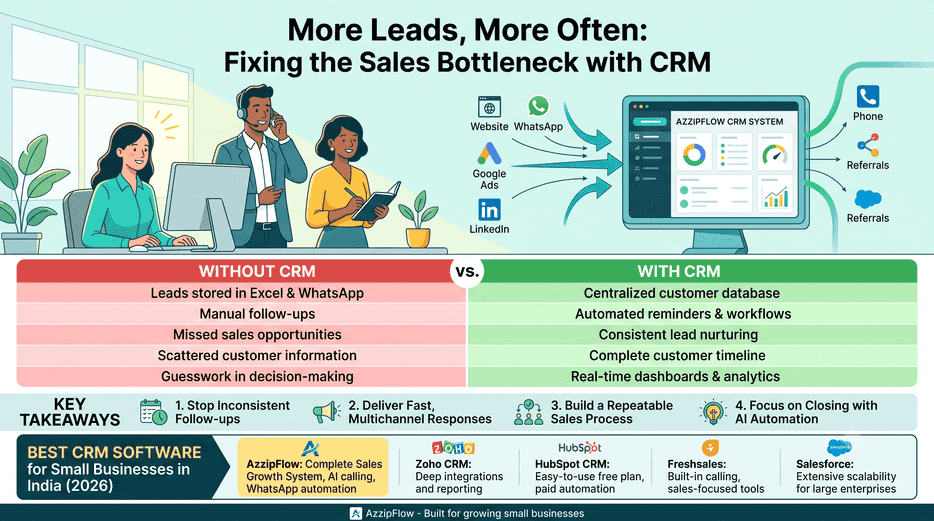
Why Most Small Businesses Don't Have a Sales Problem — They Have a Follow-up Problem
Many small businesses assume growth means more leads. More often, the real bottleneck is converting the leads already coming in.
Picture enquiries arriving in a single day from your website, WhatsApp, Google Ads, LinkedIn, referrals, and phone calls. It feels manageable at first. But as volume grows, customer information scatters across spreadsheets, notebooks, inboxes, and different employees' phones. Follow-ups slip, quotations go unanswered, and prospects quietly buy from whoever responded faster.
That's not a marketing problem. It's a sales process problem
Nucleus Research's widely cited analysis found CRM adoption returning as much as $8.71 for every $1 invested — though more recent data suggests realized returns have settled closer to $3–5 as the market matures. Either way, the direction is clear: structured customer management measurably impacts revenue.
Today's customers expect fast, personalized responses across every channel. Relying on memory or manual tracking simply doesn't scale.
A modern CRM goes well beyond storing contact details — it captures every enquiry, automates follow-ups, tracks interactions, manages the pipeline, and uses AI to lift conversion rates.
One thing growing businesses eventually realize: they don't grow by buying more software — they grow by building better systems.
The right CRM becomes that system, making sure every opportunity is captured, nurtured, and converted consistently.
Without CRM vs. With CRM
Without CRM
Leads stored in Excel & WhatsApp
Manual follow-ups
Missed sales opportunities
Scattered customer information
Guesswork in decision-making
With CRM
Centralized customer database
Automated reminders & workflows
Consistent lead nurturing
Complete customer timeline
Real-time dashboards & analytics
Key Takeaways
Most lost revenue comes from inconsistent follow-ups, not a lack of enquiries
Customers expect fast responses across every channel, not just one
A structured CRM turns ad-hoc effort into a repeatable sales process
AI-powered CRM automates routine work, freeing teams to focus on closing
What Is CRM Software and How Does It Help Small Businesses?
Customer Relationship Management (CRM) software is a centralized platform for capturing, organizing, managing, and nurturing customer relationships — from the first enquiry through post sales support.
Instead of scattering customer information across spreadsheets, emails, WhatsApp chats, notebooks, and different employees' phones, a CRM keeps every interaction in one place. Whether a lead comes from your website, Google Ads, LinkedIn, Facebook, a referral, or a phone call, it's recorded there and visible to your whole team.
Think of a CRM as the operating system for your sales process. It makes sure every enquiry gets assigned, every follow-up happens on time, and every opportunity actually moves through a structured journey instead of stalling somewhere in between.
Modern CRM software has moved well past being a digital contact book — today's platforms combine customer management with automation, AI, communication tools, and reporting to help businesses sell more efficiently.
What a CRM actually does:
Centralizes customer information — contact details, communication history, documents, quotations, invoices, and notes all live in one secure place, eliminating duplicate records and giving the whole team the same up-to-date picture.
Manages the sales pipeline — rather than guessing which deals are moving, a CRM visually tracks every lead through defined stages: New Lead → Contacted → Qualified → Meeting Scheduled → Proposal Sent → Negotiation → Won or Lost. That visibility is what lets a team prioritize the opportunities actually worth chasing.
Automates routine follow-ups — instead of relying on memory, follow-up reminders, email sequences, WhatsApp messages, meeting notifications, and task assignments can run on their own, so no enquiry gets quietly forgotten.
Delivers real business insights — reports answer the questions that actually matter: which marketing channel produces the best leads, which salesperson closes the most deals, what the pipeline is currently worth, how many follow-ups are pending, and which customers are likely to convert. That's decision-making based on data, not assumptions.
Why Modern CRM Software Is Different
By 2026, businesses expect more than basic customer management. Modern CRM platforms have evolved into complete Sales Growth Systems — combining AI-powered lead scoring, AI-assisted calling, WhatsApp automation, email automation, and sales analytics into one connected workflow built to improve both conversions and engagement.
The goal was never just to organize customer data. It's to build a repeatable sales process that captures every opportunity, responds faster, and grows the business sustainably.
Next up: why CRM software has become essential for every small business in India in 2026 — and the measurable benefits it actually delivers.
Why Every Small Business in India Needs CRM Software
Small businesses today generate enquiries from more sources than ever — websites, Google Ads, WhatsApp, LinkedIn, Facebook, referrals, phone calls, email campaigns. Generating leads has gotten easier. Managing them well hasn't.
Many business owners still run everything through spreadsheets, notebooks, or WhatsApp chats. That holds up fine at a handful of enquiries. As volume grows, it usually produces the same symptoms: missed follow-ups, duplicate records, delayed responses, and sales that quietly walk to a competitor.
This is why CRM software has stopped being optional. According to Grand View Research, the global CRM market is projected to grow from roughly $86 billion in 2026 to over $161 billion by 2033 — a clear signal that businesses everywhere are betting on structured, AI-assisted customer management over ad-hoc tracking.
A modern CRM doesn't just organize contact information. It builds a repeatable process where every enquiry gets captured, assigned, tracked, and nurtured until it converts.
What that actually delivers:
Never miss an opportunity automated reminders catch every lead before it goes cold, instead of relying on someone remembering to call back.
Respond faster, everywhere whether an enquiry lands on your website, WhatsApp, LinkedIn, or through a referral, a CRM centralizes it so your team replies quickly and consistently.
Free up your sales team less time updating spreadsheets or hunting through old chats, more time actually building relationships and closing.
Decide with data, not guesswork live dashboards show lead sources, conversion rates, pipeline health, team performance, and revenue forecasts in one place.
A real scenario a growing IT company was pulling in 250+ enquiries a month through Google Ads, LinkedIn, and referrals — all managed through Excel and WhatsApp. As volume rose, follow-ups got inconsistent, duplicate records piled up, and management genuinely lost track of which leads were still active.
After implementing a structured CRM — centralizing data, automating reminders, and tracking every activity — the team wasn't generating meaningfully more enquiries within a few months. They were simply converting more of what they already had.
That's the actual value of CRM software: it doesn't manufacture demand. It helps you keep more of the demand you're already earning.
Next up: the most common (and most expensive) mistakes small businesses make when choosing a CRM — and how to avoid one that quietly slows your growth instead of accelerating it.
Common Mistakes Small Businesses Make When Choosing CRM Software
Choosing the right CRM can genuinely transform a sales process. Choosing the wrong one just wastes time and money in a different form. Most small businesses pick a CRM based on price or popularity alone — without checking whether it actually fits how they sell.
Before you commit to one, here are the mistakes worth avoiding.
A) Choosing on Price Alone
A free or low-cost CRM looks attractive upfront, but it usually lacks what growing businesses need soon after — automation, analytics, AI features, or the ability to customize workflows.
Instead of asking "which CRM is cheapest?", the better question is "which CRM will actually generate more revenue over the next three years?" The right CRM is an investment, not a line-item expense.
B) Ignoring Automation
Plenty of businesses end up with a CRM that's really just a fancier contact list. As enquiry volume grows, employees are still doing follow-ups manually — which means the same delays and missed opportunities the CRM was supposed to fix.
Look for automated follow-up reminders, email and WhatsApp automation, task management, and AI-assisted communication. Automation is what actually frees your team to spend time on relationships instead of repetitive admin.
C) Picking a CRM That Doesn't Match Your Sales Process
Every business runs a different customer journey — a real estate company, an educational institute, a manufacturer, and an IT company all sell in fundamentally different ways. Your CRM should adapt to your sales stages, lead categories, workflows, and user permissions. It shouldn't be the other way around, with your team bending around a rigid tool.
D) Overlooking Reporting and Insights
Most owners don't notice the gap until they actually need an answer — which marketing channel is producing the best leads, how many follow-ups are overdue, which salesperson converts best, or what revenue to expect this month.
A CRM with real dashboards and analytics turns those into a five-second lookup instead of a guess. Skip this, and you're still running the business on assumptions — just with better-looking software.
E) Assuming CRM Alone Will Fix Everything
A CRM is a powerful tool. It is not a substitute for a sales process.
The real results show up when a CRM is paired with a structured workflow, genuine automation, actual team adoption, and ongoing refinement. Businesses grow through better systems — not simply by buying more software and hoping it does the work for them.
Let’s bring your ideas to life. Contact us today for a free consultation or book a demo with our team.
Best CRM Software for Small Business in India — Comparison
Choosing the right CRM isn't about picking the platform with the longest feature list. It's about finding a fit for your sales process, budget, team size, and where the business is headed — not just where it stands today.
Some platforms are built for large enterprises with layered, complex requirements. Others are built for startups and small businesses that want simplicity and automation without the overhead. Before deciding, compare on the features that actually matter to your business, not just the sticker price.
Compare Features, Not Just Price
Plenty of businesses pick a CRM because of a free plan or a low monthly fee. Then, as the business grows, they discover the features they actually need — automation, reporting, AI, deeper integrations — sit behind an expensive upgrade.
The better question isn't "which CRM is cheapest?" It's "which CRM actually supports where this business is going?"
Look for AI-Powered Automation
By 2026, "CRM" means more than contact management. The strongest platforms cut manual work through AI lead scoring, AI calling, WhatsApp and email automation, automated follow-up workflows, sales analytics, and smart reminders. These are what actually give your team more selling time and less admin time — not a nice-to-have anymore, but the baseline.
Choose a CRM That Can Grow With You
A CRM needs to support the business it's used by today — and the one it becomes in three to five years. Before deciding, it's worth checking: can it handle multiple users and roles? Does it give real business insight and KPI tracking? Can it automate communication end to end? Does it integrate with what you already use?
Picking a scalable CRM now is what saves you from an expensive, disruptive migration later — which is usually a far bigger cost than the subscription difference between plans.
How to Choose the Right CRM for Your Small Business
Picking a CRM isn't about finding the tool with the most features — it's about finding the one that fits how your business actually sells. Here's what to look at before you commit.
A) Start with your business requirements
Before comparing platforms, write down the problems you're actually trying to solve — missed follow-ups, scattered lead data, no visibility into your sales pipeline. A CRM should solve specific pain points, not just add another dashboard to check.
B) Factor in your team size
A five-person sales team and a fifty-person one need very different things. Smaller teams usually do better with simple, fast-to-adopt tools, while larger teams benefit from role-based permissions, territory management, and more structured workflows.
C) Look for real automation, not just templates
Automation is what separates a CRM that saves time from one that just stores data. Look for automated follow-ups, task reminders, lead assignment rules, and workflow triggers that reduce manual, repetitive work.
D) Check what the AI actually does
"AI-powered" gets used loosely, so look past the label. Useful AI features include lead scoring, next-best-action suggestions, conversation summaries, and predictive insights — things that genuinely help your team prioritize and close deals faster.
E) Evaluate integrations
Your CRM shouldn't operate in isolation. Check whether it connects cleanly with the tools you already rely on — WhatsApp, email, calling systems, accounting software, or marketing platforms — so data flows between them without manual entry.
F) Review implementation and support
A powerful CRM is only useful if your team can actually get up and running on it. Ask about onboarding time, training resources, and the quality of ongoing support — especially in the first few weeks, when adoption is most fragile.
G) Choose something that scales with you
Pick a CRM built to grow with your business, not one you'll outgrow in a year. Look for flexible pricing tiers, expanding feature sets, and the ability to add users or automations as your needs change.
This is the practical answer to the question most small business owners are really asking: "Which CRM should I buy?"
Why AzzipFlow Is Built for Growing Small Businesses
Most CRMs handle one piece of the sales process well and leave you stitching together other tools for the rest. AzzipFlow takes a different approach — it's built around the idea that a small business's CRM, communication, and growth tracking shouldn't live in separate systems.
Here's what that looks like in practice:
CRM A central place to manage leads, contacts, and your sales pipeline, so nothing falls through the cracks.
AI Calling Automated and AI-assisted calling that helps teams reach and follow up with leads without manual dialing.
AI Lead Scoring Leads are ranked by how likely they are to convert, so sales teams can focus their time where it matters most.
WhatsApp Automation Follow-ups, updates, and conversations happen where many customers already are, without manual back-and-forth.
Email Automation Sequenced, triggered emails that keep leads warm without someone having to send them one by one
Sales KPI Tracking Clear visibility into performance metrics, so teams can see what's working without pulling reports manually.
Growth Roadmaps Structured guidance for what to focus on next as the business scales.
Business Insights Reporting that turns raw sales activity into decisions, not just numbers on a screen.
Rather than adding CRM, AI tools, and communication automation as separate purchases, AzzipFlow brings them together — which is closer to how a growing small business actually needs to operate.